
Using Facebook Ads Library to Find Clients for Ads Agency

Author
Aaron M
Using Facebook Ads Library to find clients for an ads agency involves searching for businesses actively running ads, identifying those with consistent ad activity, and reaching out with tailored offers. This method targets warm leads already investing in advertising, making outreach more effective.
Using Facebook Ads Library to Find Clients for Your Agency
100 free credits
Want agency clients from Meta Ads Library?
You are already looking at businesses that pay for ads - turn that into a pipeline: filter advertisers, pull public contacts, export. Sign in and try the Web scraper; new accounts include free credits.
Finding clients for an ads agency is hard when you’re targeting cold businesses.
Most lists are outdated. Most companies aren’t running ads. Most don’t even have budget.
Facebook Ads Library changes this completely.
It lets you find businesses that are already spending money on ads right now.
That means:
- they understand advertising
- they have budget
- they are much easier to convert
If you use it правильно, you can build a consistent pipeline of warm leads without guessing.
Why Facebook Ads Library is Perfect for Client Prospecting
This is one of the simplest but most powerful lead generation channels.
1. You’re targeting warm leads
These businesses are already paying for ads.
You’re not convincing them to start. You’re helping them improve.
Big difference.
2. You can see their creatives
You instantly understand:
- how they position offers
- what they promote
- how strong (or weak) their ads are
In many cases, you’ll spot problems in seconds.
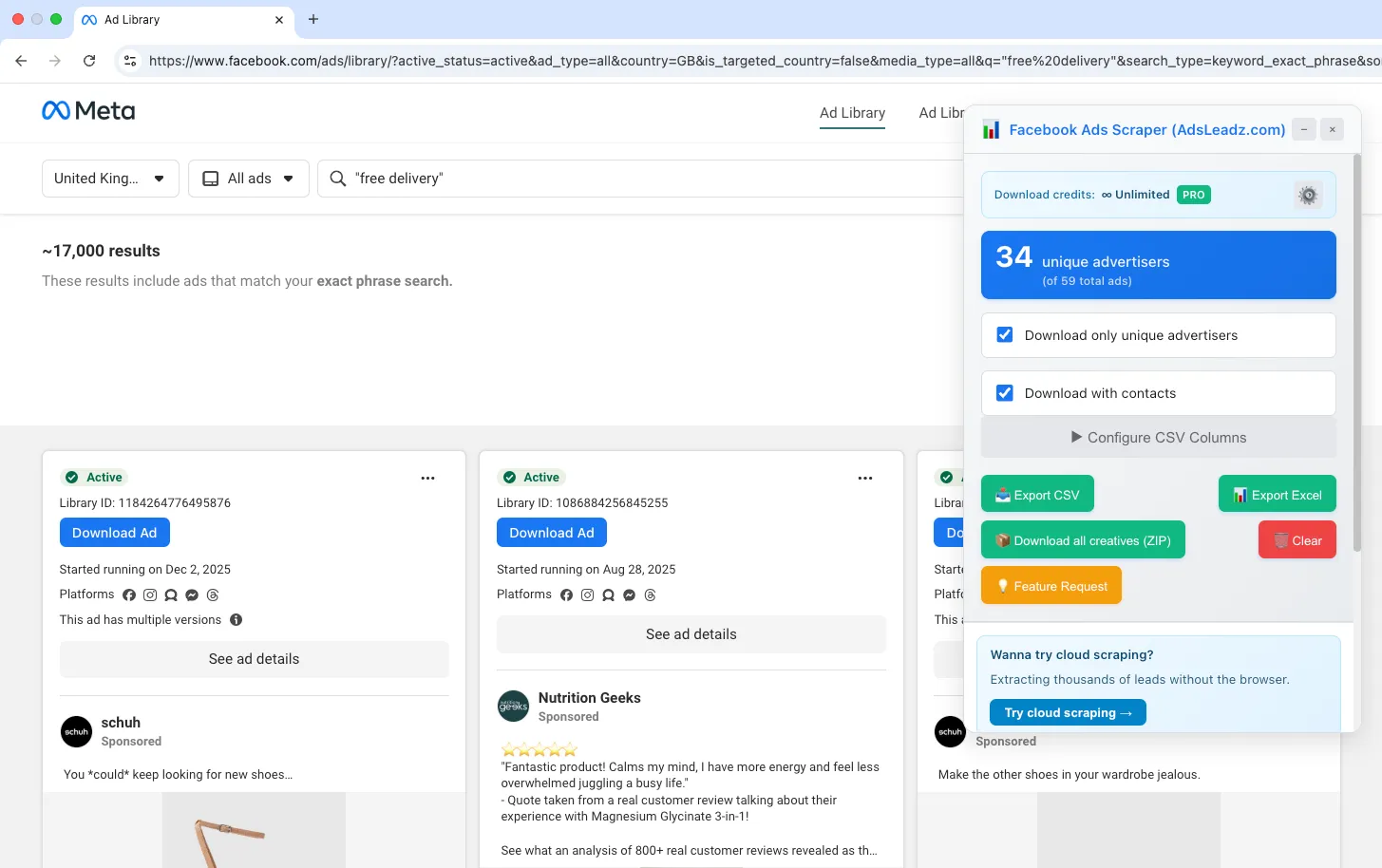
3. You can estimate budget indirectly
If a company runs:
- 1–2 ads → testing
- 5–10 ads → consistent spend
- 20+ ads → serious budget
More ads = more opportunity.
Step-by-Step: How to Find Clients Using Facebook Ads Library
This is the exact process agencies use.
Step 1 - Search by niche + location
Use simple, customer-style queries.
Examples:
- “dentist near me”
- “roof repair”
- “personal injury lawyer”
- “kitchen remodeling”
Set location:
- United States (or your target market)
This gives you relevant advertisers instantly.
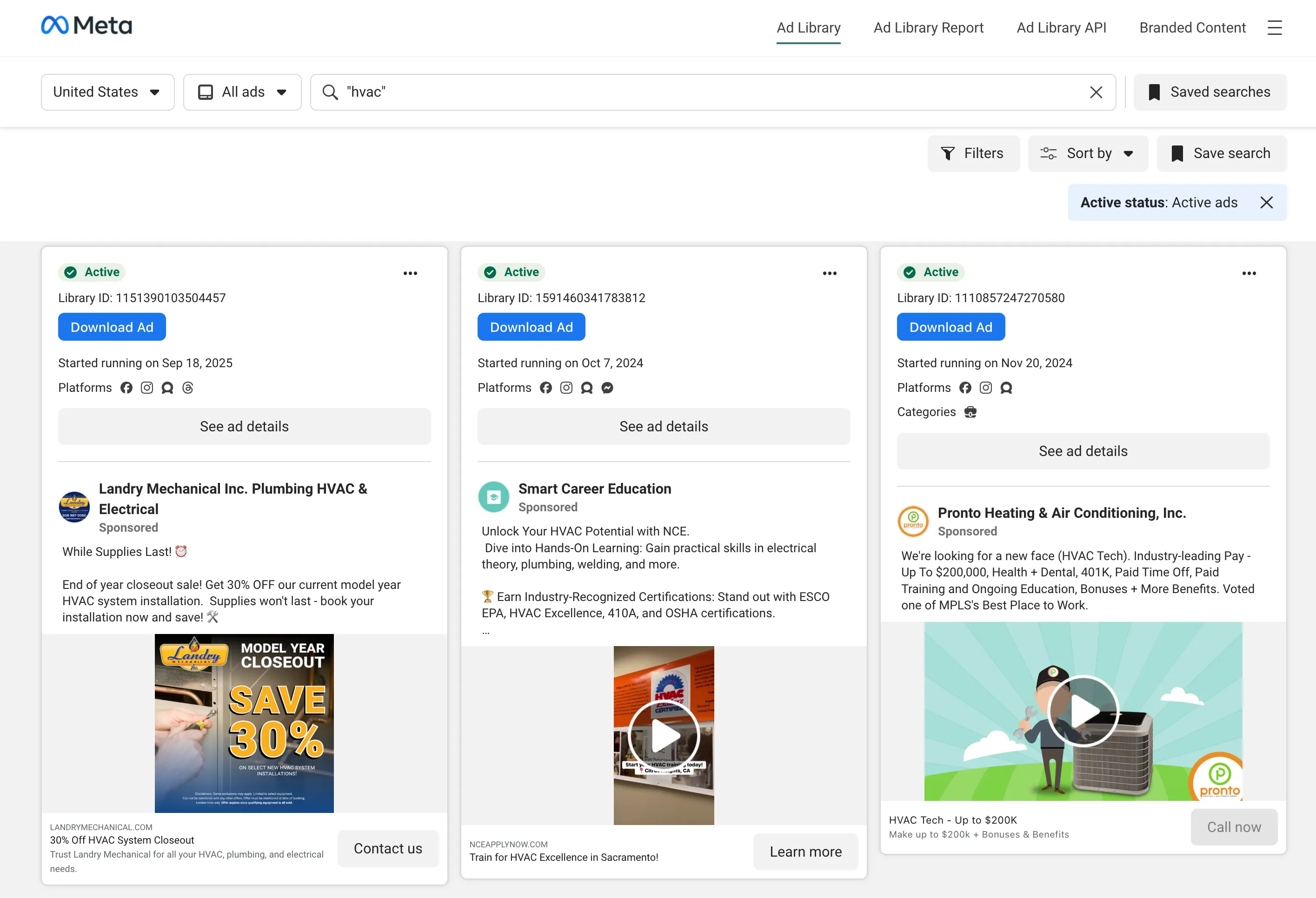
Step 2 - Identify serious advertisers
Don’t contact everyone.
Look for:
- multiple active ads (5+)
- consistent creatives
- not just one test campaign
These are businesses already investing.
Step 3 - Visit their website or page
Click through and check:
- website quality
- landing page speed
- presence of funnel
- contact options
You’re looking for gaps.
Example:
- slow site
- no clear CTA
- weak offer
That becomes your pitch.
Step 4 - Qualify leads
Before outreach, filter:
Good lead:
- real business
- active ads
- has website
- clear service
Bad lead:
- random pages
- no site
- irrelevant niche
Quality > quantity.
How to Scale This Process
Manual workflow looks like this:
- 2–3 hours → 20–30 leads
- most without emails
It works, but it doesn’t scale.
Scaling with tools (AdsLeadz)
Instead of manual copy-paste, AdsLeadz lines up with what we list on pricing & features:
- Find advertisers in Meta Ads Library (keyword, industry, location—your normal search flow)
- Extract public contacts from advertiser sites: emails, phones, social links
- Qualify by ad spend signal and review results in a table
- Export to CSV for your CRM or outreach tools
- Chrome extension works inside the library; Web adds scale, advanced filters, and REST API access
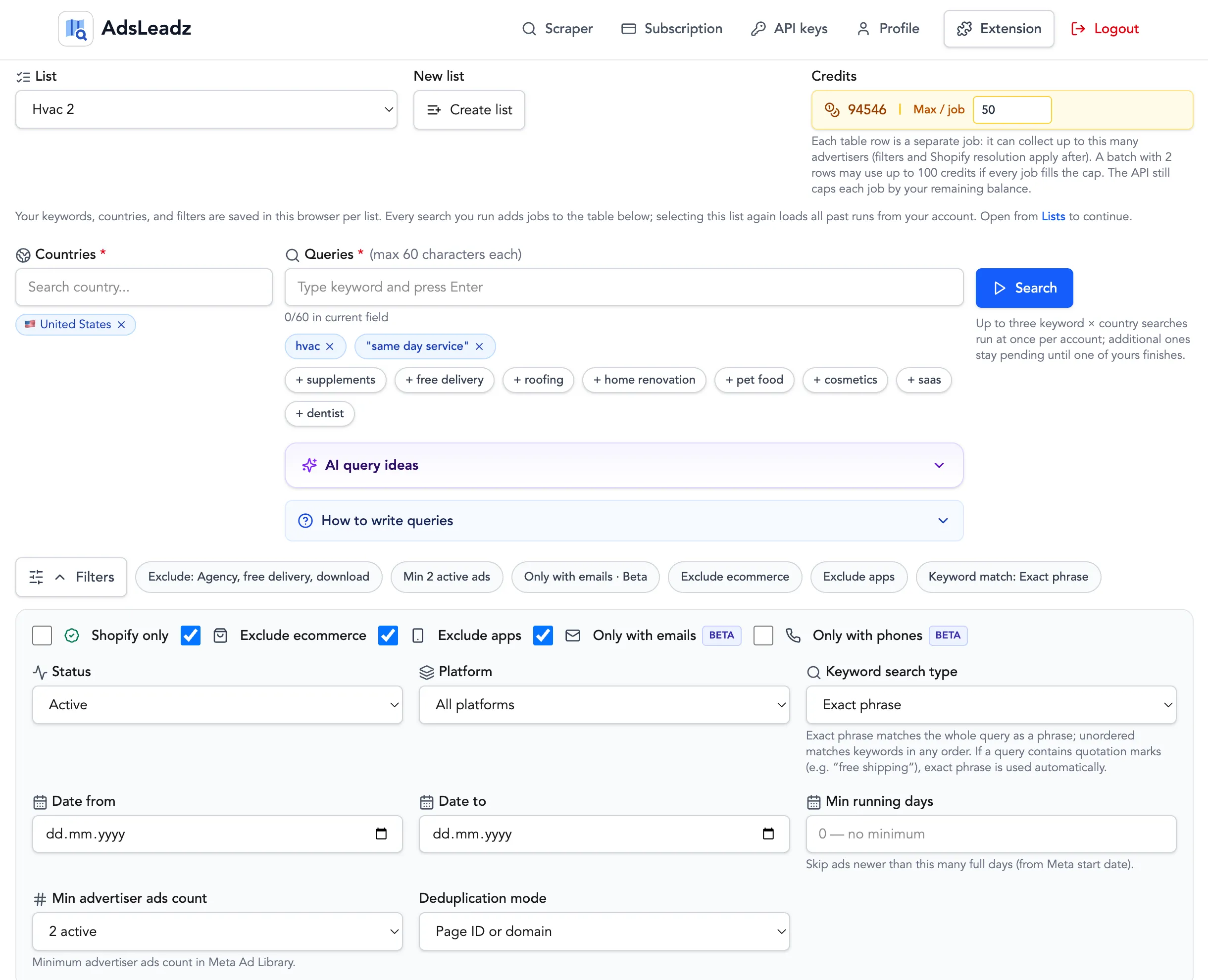
Filters (Chrome extension + Web; the last three are Web-only):
- Ads count filters — find advertisers that look like real spend, not one-ad tests.
- Running days filters — keep pages that have been running long enough to care about.
- Active status filters — stay on what is actually live in the library.
- Date filters — limit ads to the time window you want.
- Negative keyword filters — remove noisy niches from the results.
- Unique results — dedupe pages so your list stays clean.
- Platform filters — narrow Facebook vs Instagram when that matches your ICP.
- Shopify filters — target or avoid Shopify stores (Web only).
- Vertical exclusion filters — cut e‑commerce, apps, and other verticals you do not want (Web only).
- Contact-type filters — only email or only phones for cleaner outreach lists (Web only).
Typical outcome with a focused search:
- 300–1k leads in minutes instead of hours
- No manual scraping or tab-hopping
It turns Facebook Ads Library prospecting into a repeatable system.
100 free credits
Try the Web scraper
Sign in to use filters, extract public contacts, and export leads. New accounts get credits to try the Web product at no cost.
Common Mistakes
1. Targeting everyone
You don’t need all businesses.
Focus on:
- those running multiple ads
- those with clear budget
2. Contacting test advertisers
If they run 1 ad → skip.
They’re not ready yet.
3. Ignoring location
Geo matters.
A “dentist” in the US and in a small market are very different leads.
4. Sending generic messages
Bad:
Hi, we run ads
Good:
Saw you’re running ~10 ads for roofing Your landing page loads in ~4s - we helped reduce this to 2s and increase leads by 28% Want me to show what we’d fix?
Tools That Help
AdsLeadz
Best for:
- scaling lead generation
- extracting contacts
- filtering results
Apollo (optional)
Useful for:
- enrichment
- additional contact data
- outreach workflows
Final Takeaway
Using Facebook Ads Library to find clients for an ads agency is one of the most practical strategies today.
You’re not guessing. You’re targeting businesses already spending money.
If you combine:
- manual validation
- smart filtering
- tools like AdsLeadz
You get a predictable flow of qualified leads.
External Sources
Frequently Asked Questions
Similar Articles

How Agencies Use Meta Ads Library for Prospecting
A practical guide showing agencies how to use Meta Ads Library to find clients already investing in digital advertising. ...

How to Find Advertisers: A Tactical Guide with Meta Ads and Automation
A comprehensive guide to finding advertisers through Meta Ads Library and automation tools. ...

Meta Ads Library Scraper vs Manual Research: The Tipping Point Guide to ROI
A comprehensive guide comparing manual Meta Ads Library research with automated scrapers for maximizing advertising intelligence ROI. ...

How UGC Creators Find Brands Running Ads: A Data-Driven Guide
Discover proven methods for UGC creators to identify brands actively running ads and secure paid partnerships through data-driven prospecting. ...

How to Extract Advertiser Brands from Meta Ads Library (2026 Guide)
A practical guide to extracting advertiser brands from Meta Ads Library, including scraping methods, normalization, and scaling workflows. ...