


Build a swipe file
Save ads from the extension and group them into boards for products, brands or creative ideas.
ADSLEADZ CHROME EXTENSION
Download videos and images directly from Meta Ads Library, or save ads to your AdsLeadz dashboard. Use filters to narrow your results and open Shopify store insights from the extension.
For Chrome on desktop. Unlimited downloads with Ad Downloader — $9/month.
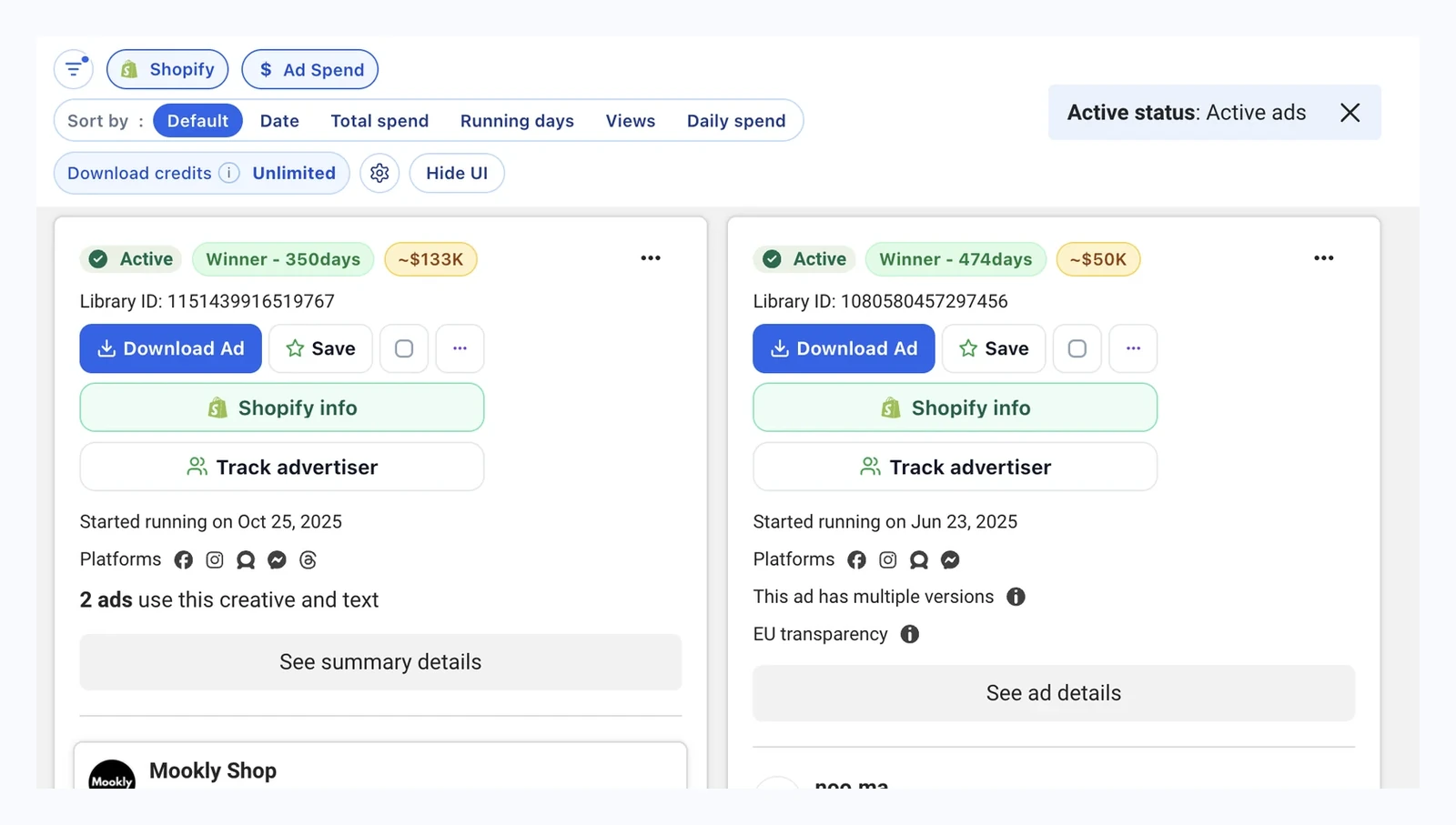
DOWNLOAD ADS
Select the ads you want in Meta Ads Library and download their available videos, images and carousel assets. Get the files in a ZIP, with ad copy and details included.
Download multiple ads in one go
Available videos, images and carousel assets.
Keep creative files and ad copy together
Ad text, CTA, advertiser name and ad IDs.
Export ad data to CSV or Excel
Open ad details in your spreadsheet.
Meesho 882466211548414.zip
├── images/
│   ├── image_1.jpg
│   ├── image_2.jpg
│   └── …
├── meta.txt
└── ad_info.csv
Real single-ad example from Meesho. Video ads include a videos/ folder instead of images/.
SAVED ADS & BOARDS
Found an ad you want to revisit? Save it from the extension to your AdsLeadz dashboard. Group ads into boards, add notes and tags, and find them again when you need them.
Saved ads and boards are available with Ad Downloader and above. Current save limits apply.
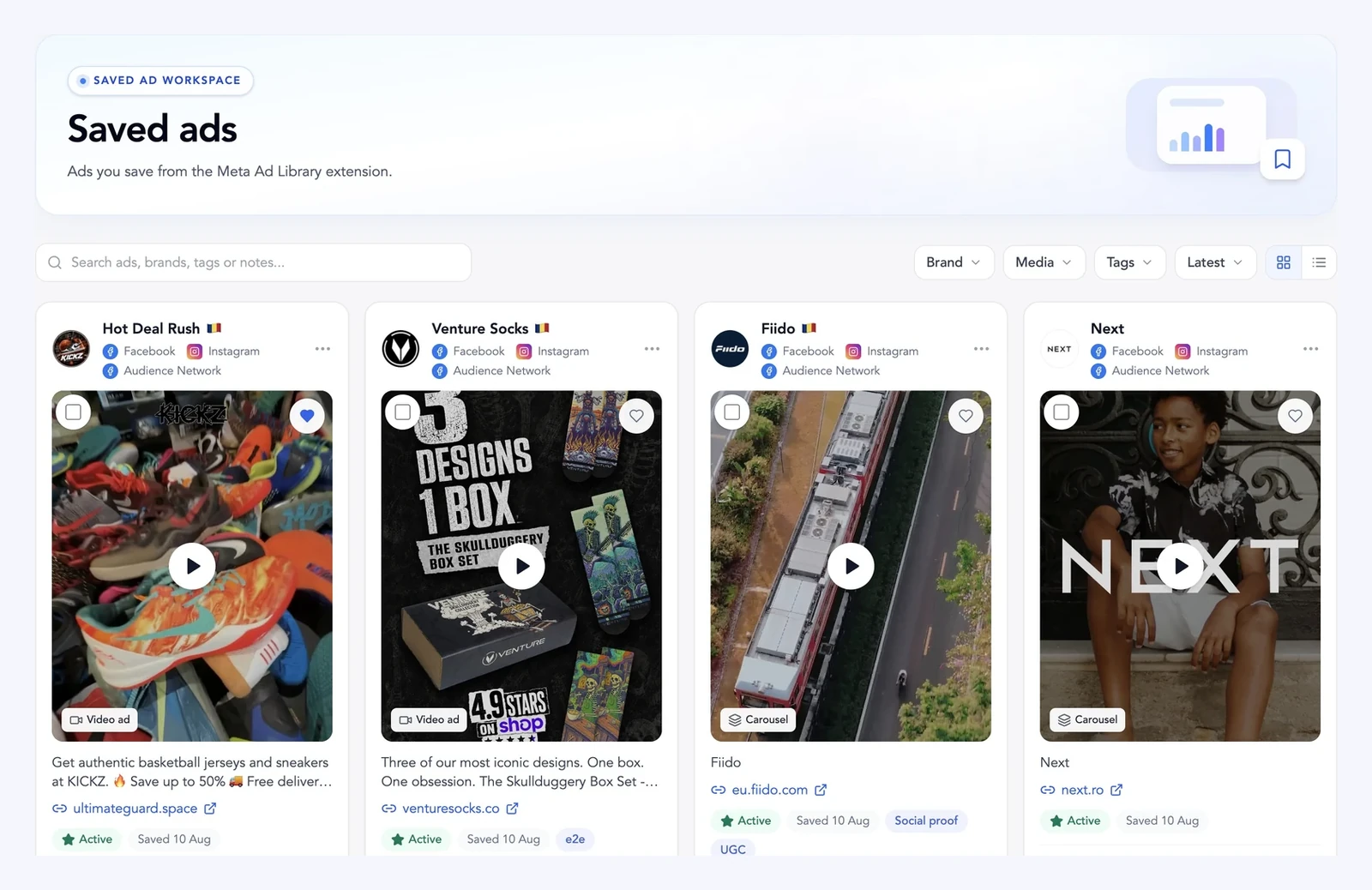
ECOMMERCE AD RESEARCH
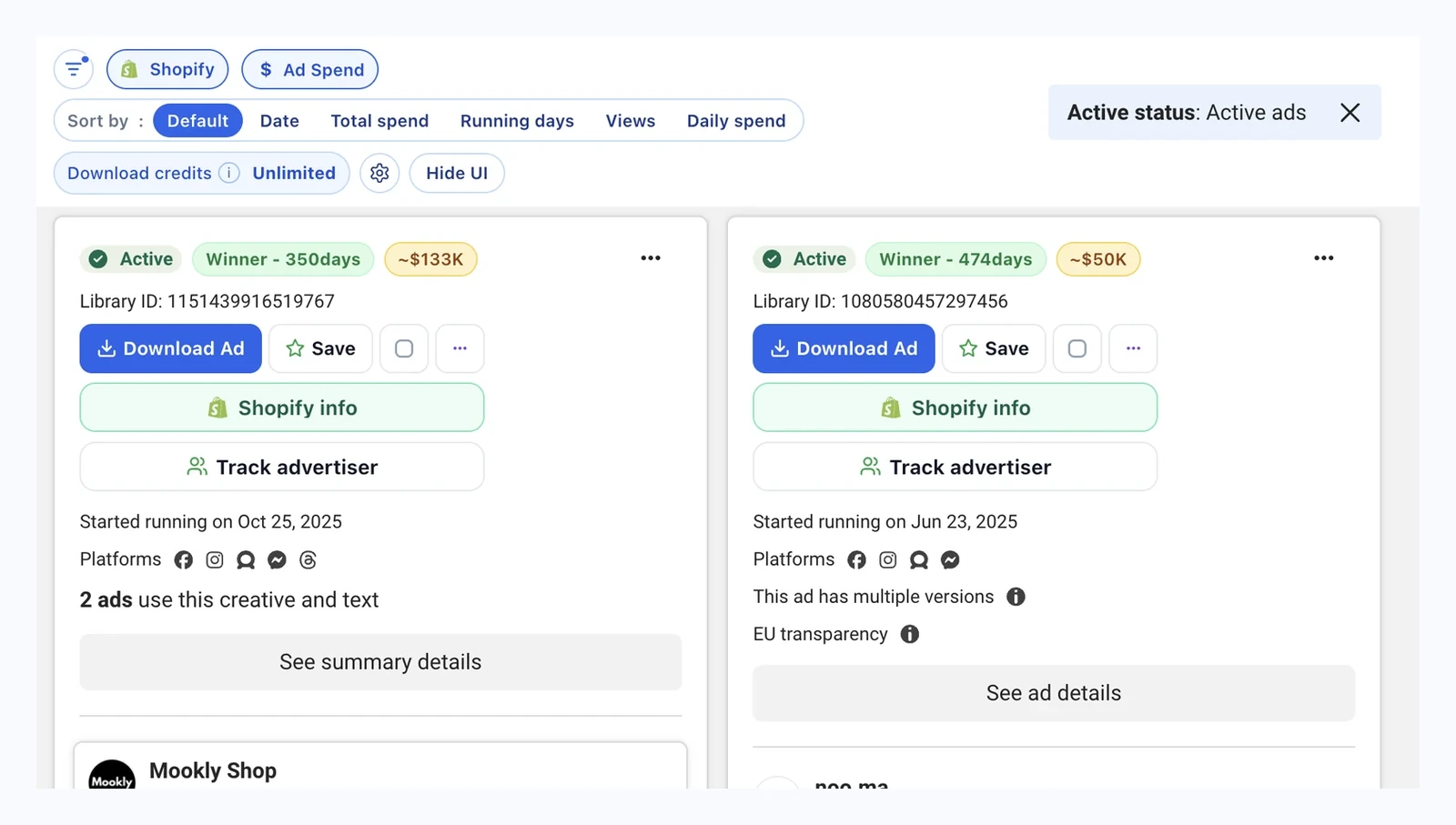
Turn on the Shopify filter in the extension to narrow your results to ads linking to Shopify stores. Then save the ads you want to revisit or download their creatives.
Shopify ad filtering is included with Ad Downloader.
SHOPIFY STORE INSIGHTS
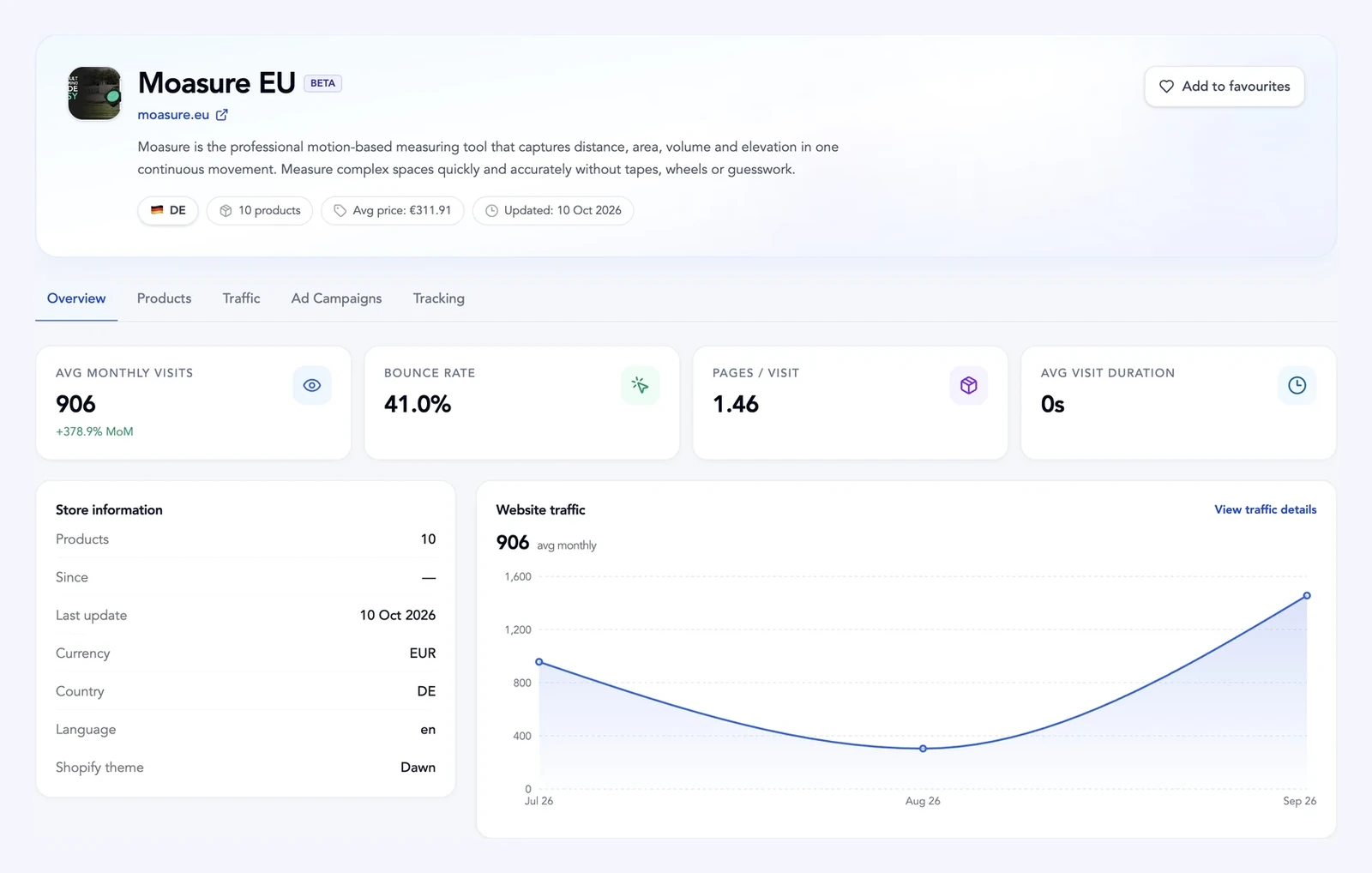
Open Shopify info from the extension to view estimated sales, website traffic and products for the store behind the ad.
Store access depends on your plan and available store credits. Full catalog browsing requires Basic or above. Sales and traffic figures are estimates.
EXTENSION FILTERS
Narrow the ads you collect by running time, active status, dates or platform. Exclude keywords and use the unique advertisers filter to explore more brands.

These filters and sorting options are included with Ad Downloader.
| Feature | What it does |
|---|---|
| Bulk ad downloads | Download creatives from multiple ads in one workflow instead of pasting ad URLs individually. |
| Video downloads | Save downloadable video files exposed by Meta Ads Library for the selected ads. |
| Image downloads | Save available image creatives from the selected ads. |
| Carousel creatives | Download assets from carousel cards rather than saving each card manually. |
| Ad copy and IDs | Keep ad text and identifiers together with downloaded creatives. |
| Organized downloads | Package assets in per-ad folders inside a creatives ZIP, or as a single-ad ZIP with images, videos, meta.txt and ad_info.csv. |
| Multi-ad selection | Choose several ads from the current Meta Ads Library results with batch toggles. |
| Direct Ads Library integration | Use the downloader directly inside Meta Ads Library on facebook.com/ads/library. |
| Active status | Show only ads that are currently active. |
| Running days | Narrow ads based on how long they have been running. |
| Estimated ad spend | Filter by minimum estimated ad spend using EU transparency data when Ads Library country is set to an EU region. |
| Negative keywords | Exclude ads whose copy, titles or CTA text contain unwanted terms. Optional ecommerce preset available. |
| Unique advertisers | Export or download only one row per advertiser when unique results is enabled. |
| Output / field | Description | Example |
|---|---|---|
| Video creatives | Available video files saved under a videos/ folder when the ad includes them. | videos/video_1.mp4 |
| Image creatives | Static image files saved under an images/ folder when the ad includes them. | images/image_1.jpg |
| meta.txt | Human-readable ad copy from the Meta snapshot, such as Body, Caption and CTA. | Body: … / CTA: Shop now |
| ad_info.csv | One CSV row with structured ad metadata for spreadsheets and research workflows. | 13 columns — see fields below |
| ad_archive_id | Meta Ads Library archive identifier for the downloaded ad. | 882466211548414 |
| page_id | Facebook Page identifier associated with the ad. | 269617286730030 |
| page_name | Advertiser or Facebook Page name. | Meesho |
| page_profile_uri | Facebook profile URL for the advertiser page. | facebook.com/meeshosupply/ |
| link_url | Destination URL used in the ad when exposed by Meta Ads Library. | meesho.com |
| facebook_url | Direct link back to the ad in Meta Ads Library. | facebook.com/ads/library/?id=882466211548414 |
| start_date | Ad start date as a Unix timestamp in the CSV export. | 1780470000 |
| end_date | Ad end date as a Unix timestamp in the CSV export. | 1783062000 |
| body_text | Primary ad copy shown in Meta Ads Library. | WELCOMEBACK with up to 20% OFF… |
| caption | Caption or link label field when exposed for the ad. | meesho.com |
| cta_text | Call-to-action label exposed for the ad. | Shop now |
| page_like_count | Page like count when exposed by Meta Ads Library. | 1651041 |
| publisher_platform | Platforms where the ad ran, separated by semicolons in the CSV. | FACEBOOK;INSTAGRAM;AUDIENCE_NETWORK;THREADS |
HOW TO USE THE EXTENSION

Select ads → download to your computer or save to your dashboard
Add AdsLeadz to Chrome, sign in and open Meta Ads Library.
Search for a brand or keyword. Scroll to collect ads, then use the extension’s filters to narrow your selection.
Download selected creatives to your computer, or save ads to your dashboard and organize them into boards.
USE CASES
Start with the ads you find in Meta Ads Library.
Save ads from the extension and group them into boards for products, brands or creative ideas.
Select ads from one or more advertisers and download their available videos and images together.
Download a ZIP with ad text and details so you can revisit the hook, offer and call to action.
Turn on the Shopify filter, then save or download ads linking to stores you want to explore.
Open Shopify info from the extension to review products and estimated sales and traffic. Plan and credit limits apply.
Export selected ad data to CSV or Excel to compare advertisers, dates, platforms and other available fields.
PLANS
Download creatives, filter ads and build your saved ads collection.
Save limits apply. Cancel anytime.
Add Shopify store insights and competitor tracking.
Store credits and current access limits apply.
Sales and traffic figures are estimates. Cancel anytime.
BEFORE YOU INSTALL
For Google Chrome on desktop.
FAQ
Export collected ad data to CSV or Excel, including advertiser name, ad IDs, copy, destination links, platforms, dates and running days when available. EU estimated ad spend depends on Meta’s transparency data and an EU country setting. Ad Downloader includes ad data exports without contact fields.
Email, phone and social profile extraction from advertiser websites requires Basic or above. Ad Downloader covers creatives and ad data, without contact fields. Contacts are included only when publicly available.
AdsLeadz works directly inside Meta Ads Library in Google Chrome on desktop. Install the extension and sign in to your AdsLeadz account to get started.
Yes. Scroll to collect ads, select the ones you need and download their available creatives together.
You can download available videos, images and carousel assets, along with ad copy and details. Creative files come in a ZIP, and ad data can be exported to CSV or Excel.
Downloading puts the files on your computer. Saving adds the ad to your AdsLeadz dashboard, where you can organize it into boards and add notes and tags.
The Shopify filter is included with Ad Downloader and helps you find ads linking to Shopify stores. Store insights have separate plan and credit requirements. Sales and traffic figures are estimates.
Unlimited extension downloads require a paid plan. Ad Downloader costs $9/month and includes filters, saved ads and boards. Save limits apply.
FILTER AVAILABILITY
See which filters are included in each plan. Core filters work in the Chrome extension; advanced filters are for the Leads Scraper web workflow.
Core Ads Library filters — narrow advertisers before you extract or export.
Meta Ads Library · Advertiser ads count requires Basic or above.
| Filter | Ad Downloader | Basic | Leads Scraper |
|---|---|---|---|
| Filter by advertiser ads count | Not included | Included | Included |
| Running days | Included | Included | Included |
| Active status | Included | Included | Included |
| Date filters | Included | Included | Included |
| Negative keywords | Included | Included | Included |
| Unique results | Included | Included | Included |
| Platform | Included | Included | Included |
| Shopify filter (Chrome extension) | Included | Included | Included |
Rich targeting in the Web scraper — Shopify, vertical exclusions, and contact-type filters.
Web scraper · Shopify filters here apply to the web scraper, not the extension toggle.
| Filter | Ad Downloader | Basic | Leads Scraper |
|---|---|---|---|
| Shopify filters | Not included | Not included | Included |
| Exclude verticals (e.g. e‑commerce, apps, …) | Not included | Not included | Included |
| Only email | Not included | Not included | Included |
| Only phones | Not included | Not included | Included |
Shopify filtering inside the Chrome extension is included with Ad Downloader and above. Advanced Shopify, vertical and contact filters in the web scraper require Leads Scraper.
DOWNLOADS & EXPORTS
Export ad details to CSV or Excel and download available creative files. Advertiser contact extraction requires Basic or above.
| Category | Plan availability | Fields |
|---|---|---|
Ad Information Structured ad data for CSV / Excel exports. | Ad Downloader+ |
|
Contact Information Contact extraction is not included with Ad Downloader. | Basic+ only |
|
Media Available creative files for download. | Ad Downloader+ |
|
Files and fields depend on what Meta Ads Library and advertiser websites expose. Contact fields are available only when found; they are not included in Ad Downloader exports.
ADSLEADZ CHROME EXTENSION
Download creatives or save ads to your dashboard directly from Meta Ads Library.
Chrome on desktop · Paid plan required for unlimited downloads